Juniper EVPN/VXLAN-Mac-VRF-1
A couple of years ago, I spent quite a bit of time working with Juniper EVPN/VXLAN. Back then, I mainly used the virtual-switch instance type for VXLAN deployments.
Recently, I noticed Juniper introduced mac-vrf as another option for EVPN/VXLAN. Curious about the differences, I read through the documentation and built a small lab to test it myself.
This post is mostly a collection of my notes and lab configurations—something to look back on when I inevitably forget the details a few years from now.
Lab environment
Platform : vMX
Junos: 24.4R1.9
loopback0
Spine-1 :10.1.1.1
Spine-1 :10.1.1.2
leaf-3 : 10.1.1.3
leaf-4 : 10.1.1.4
leaf-5 : 10.1.1.5 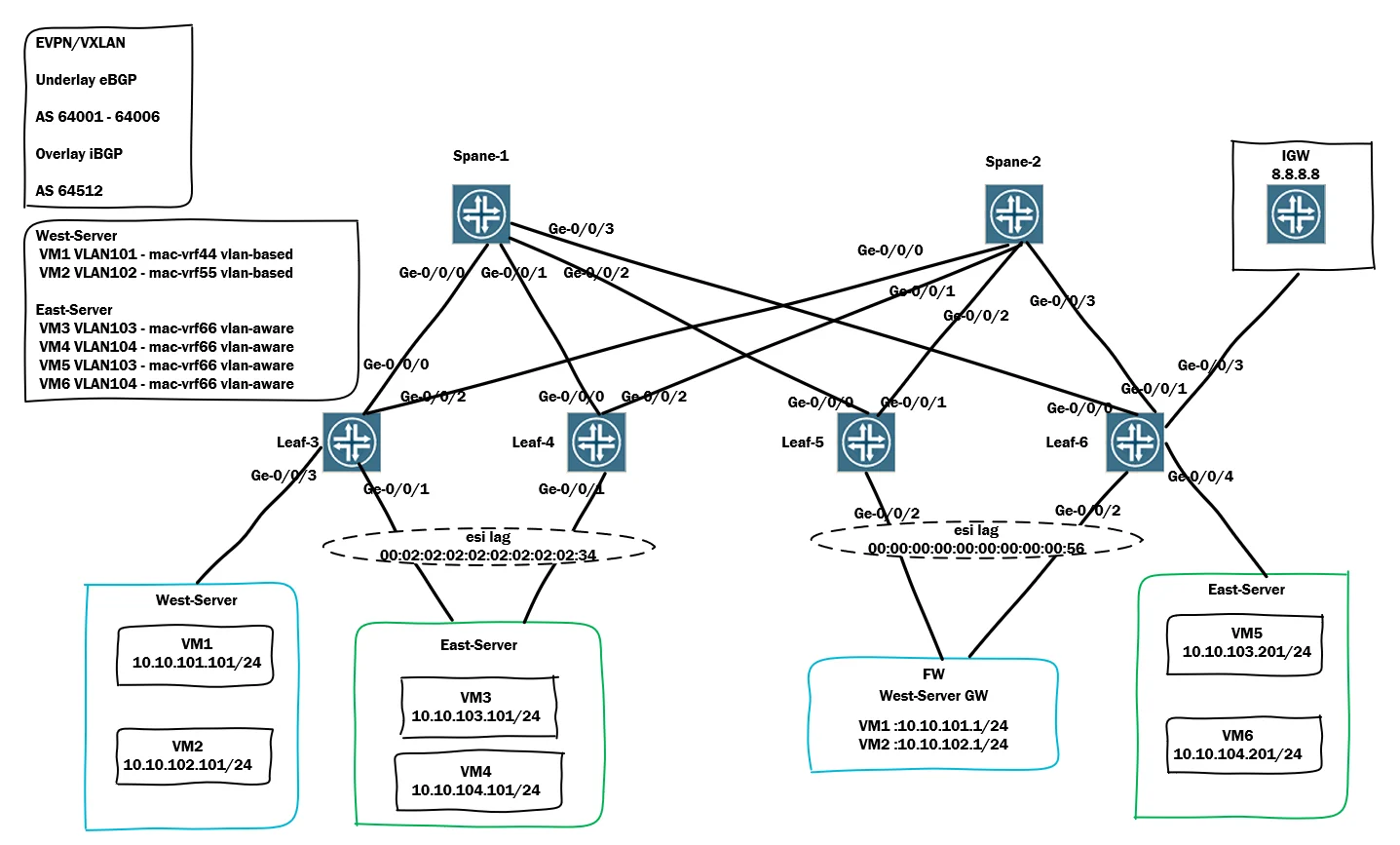
Two Architectures in EVPN-VXLAN Deployments
Why Choose an ERB Design?
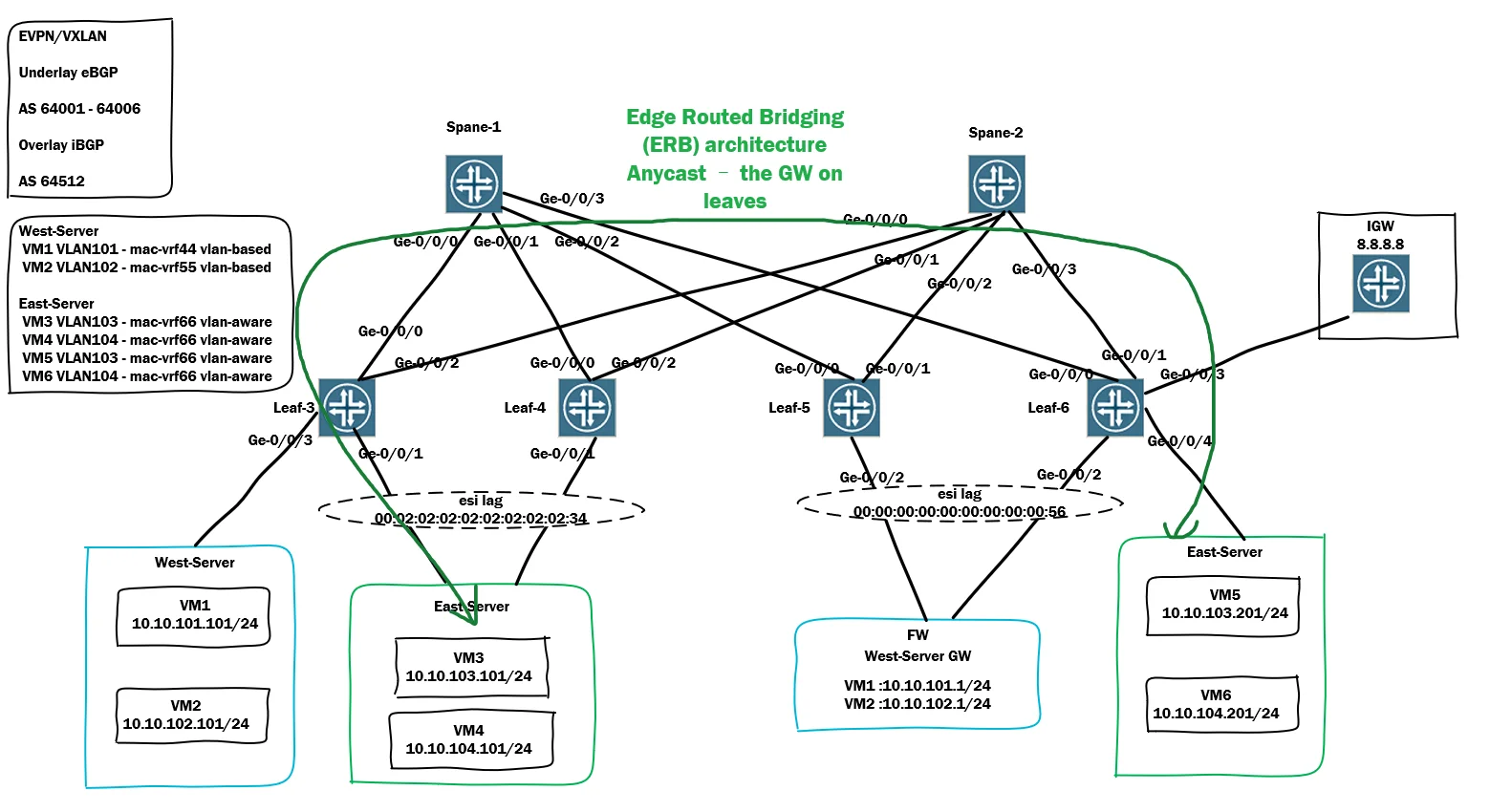
Edge-Routed Bridging (ERB) is commonly used when the fabric is responsible for Layer 3 gateway services.
Benefits include:
- Reduced Layer 2 blast radius
- Better tenant isolation and segmentation
- Distributed tenant gateway and IP management
- Optimized east-west traffic forwarding within the fabric
- Improved scalability for multi-tenant environments
Why Choose a BO Design?
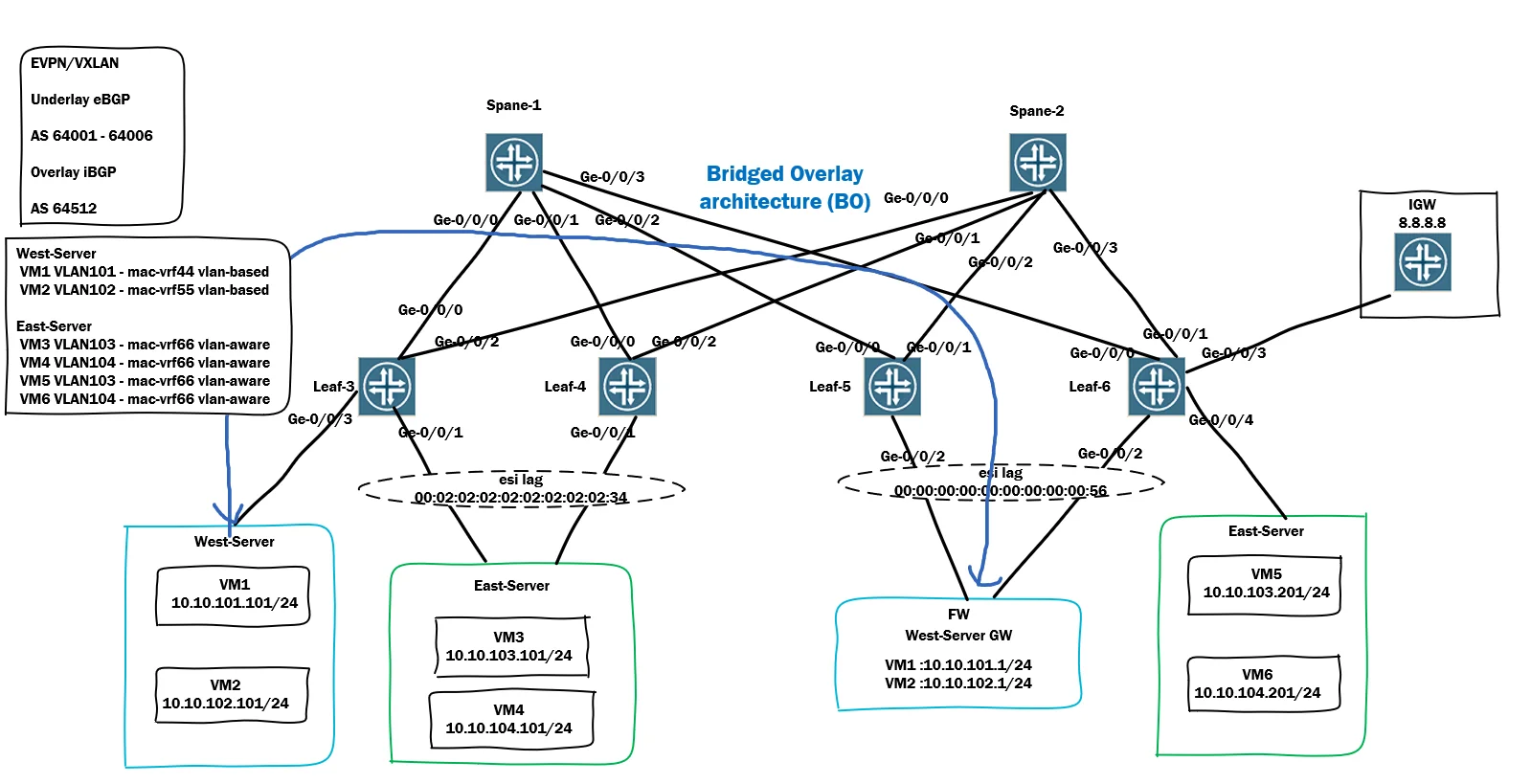
Bridged Overlay (BO) is typically used when Layer 3 gateways remain outside the EVPN-VXLAN fabric.
Common use cases include:
- No requirement to migrate existing IP gateways into the fabric
- IP gateways are managed by external devices such as firewalls, routers, or legacy infrastructure
- Support for overlapping VLAN IDs across different services
- VLAN bundling services
- Simpler migration from traditional Layer 2 environments
The choice between ERB and BO depends on where Layer 3 gateway services are located and the operational requirements of the network.
MAC-VRF Layer 2 Service Options
Juniper EVPN-VXLAN MAC-VRF supports three Layer 2 service models:
1. VLAN-Based Service
1 VLAN : 1 EVI : 1 MAC-VRF
Characteristics:
- Each VLAN/VNI is mapped to a dedicated MAC-VRF (EVI).
- Each VLAN gets its own bridge table.
- Route Targets (RTs) are assigned per VLAN-VNI.
- Provides the highest level of isolation.
- Commonly used when strict tenant separation is required.
Example:
| VLAN | VNI | MAC-VRF |
|---|---|---|
| VLAN 10 | VNI 10010 | MAC-VRF-10 |
| VLAN 20 | VNI 10020 | MAC-VRF-20 |
2. VLAN-Aware Service
Multiple VLANs/VNIs : 1 MAC-VRF
Characteristics:
- Multiple VLANs can belong to the same MAC-VRF.
- Each VLAN still maintains its own bridge table.
- Route Targets are assigned per MAC-VRF.
- Reduces the number of EVPN routes and control-plane state.
- Easier to scale when many VLANs belong to the same tenant.
Example:
| VLAN | VNI | MAC-VRF |
|---|---|---|
| VLAN 10 | VNI 10010 | Tenant-A |
| VLAN 20 | VNI 10020 | Tenant-A |
| VLAN 30 | VNI 10030 | Tenant-A |
3. VLAN-Bundle Service
Multiple VLANs : 1 VNI : 1 MAC-VRF
Characteristics:
- Multiple VLANs share the same VNI and MAC-VRF.
- All VLANs use the same bridge table.
- Lowest EVPN route scale.
- Supports overlapping VLAN IDs through SP-style interfaces.
- VLAN normalization is not supported.
- Commonly used in Bridged Overlay (BO) architectures.
Example:
| VLAN | VNI | MAC-VRF |
|---|---|---|
| VLAN 10 | VNI 5000 | Bundle-A |
| VLAN 20 | VNI 5000 | Bundle-A |
| VLAN 30 | VNI 5000 | Bundle-A |
Quick Comparison
| Feature | VLAN-Based | VLAN-Aware | VLAN-Bundle |
|---|---|---|---|
| VLAN → EVI Mapping | 1:1 | N:1 | N:1 |
| Bridge Table | Per VLAN | Per VLAN | Shared |
| VNI | Per VLAN | Per VLAN | Shared |
| Route Scale | Highest | Medium | Lowest |
| VLAN Normalization | Yes | Yes | No |
| Typical Use Case | Maximum isolation | Multi-VLAN tenant | Bridged Overlay (BO) |
VLAN-Based → each VLAN/VNI gets a dedicated EVI (MAC-VRF service instance).
VLAN-Aware → multiple VLANs/VNIs under one MAC-VRF, but each VLAN still has its own bridge table.
VLAN-Bundle → multiple VLANs share both the same MAC-VRF and the same bridge table, which is the major difference from VLAN-Aware.
The EVPN MAC-VRF Lab verification
BGP adjacency
root@spine-1# run show bgp summary
Threading mode: BGP I/O
Default eBGP mode: advertise - accept, receive - accept
Groups: 2 Peers: 8 Down peers: 0
Table          Tot Paths  Act Paths Suppressed    History Damp State    Pending
inet.0
                      20          8          0          0          0          0
bgp.evpn.0
                      96         96          0          0          0          0
Peer                     AS      InPkt     OutPkt    OutQ   Flaps Last Up/Dwn State|#Active/Received/Accepted/Damped...
10.1.1.3              64512      69606      53019       0       0 2w2d 19:27:30 Establ
  bgp.evpn.0: 31/31/31/0
10.1.1.4              64512      53291      69297       0       0 2w2d 19:27:13 Establ
  bgp.evpn.0: 25/25/25/0
10.1.1.5              64512      53355      68919       0       0 2w2d 19:26:37 Establ
  bgp.evpn.0: 8/8/8/0
10.1.1.6              64512      53295      68841       0       0 2w2d 19:28:07 Establ
  bgp.evpn.0: 32/32/32/0
10.13.1.1             64003      53282      52749       0       0 2w2d 19:28:54 Establ
  inet.0: 2/5/5/0
10.14.1.1             64004      53247      52746       0       0 2w2d 19:28:52 Establ
  inet.0: 2/5/5/0
10.15.1.1             64005      53248      52744       0       0 2w2d 19:29:05 Establ
  inet.0: 2/5/5/0
10.16.1.1             64006      53248      52749       0       0 2w2d 19:29:01 Establ
  inet.0: 2/5/5/0

[edit]
root@spine-1#
root@spine-2# run show bgp summary
Threading mode: BGP I/O
Default eBGP mode: advertise - accept, receive - accept
Groups: 2 Peers: 8 Down peers: 0
Table          Tot Paths  Act Paths Suppressed    History Damp State    Pending
inet.0
                       8          8          0          0          0          0
bgp.evpn.0
                      94         94          0          0          0          0
Peer                     AS      InPkt     OutPkt    OutQ   Flaps Last Up/Dwn State|#Active/Received/Accepted/Damped...
10.1.1.3              64512      68947      53059       0       0 2w2d 19:40:52 Establ
  bgp.evpn.0: 27/27/27/0
10.1.1.4              64512      53311      69366       0       0 2w2d 19:40:08 Establ
  bgp.evpn.0: 25/25/25/0
10.1.1.5              64512      53377      68965       0       0 2w2d 19:41:00 Establ
  bgp.evpn.0: 10/10/10/0
10.1.1.6              64512      53312      68898       0       0 2w2d 19:39:14 Establ
  bgp.evpn.0: 32/32/32/0
10.23.1.1             64003      53303      52783       0       0 2w2d 19:40:55 Establ
  inet.0: 2/2/2/0
10.24.1.1             64004      53270      52784       0       0 2w2d 19:40:59 Establ
  inet.0: 2/2/2/0
10.25.1.1             64005      53272      52783       0       0 2w2d 19:41:13 Establ
  inet.0: 2/2/2/0
10.26.1.1             64006      53270      52783       0       0 2w2d 19:41:09 Establ
  inet.0: 2/2/2/0
root@leaf-r3# run show bgp summary
Threading mode: BGP I/O
Default eBGP mode: advertise - accept, receive - accept
Groups: 2 Peers: 4 Down peers: 0
Table Tot Paths Act Paths Suppressed History Damp State Pending
inet.0
10 5 0 0 0 0
bgp.evpn.0
130 65 0 0 0 0
Peer AS InPkt OutPkt OutQ Flaps Last Up/Dwn State|#Active/Received/Accepted/Damped...
10.1.1.1 64512 53060 69647 0 1 2w2d 19:43:26 Establ
bgp.evpn.0: 65/65/65/0
macvrf44-vlan-based.evpn.0: 6/6/6/0
__default_evpn__.evpn.0: 3/3/3/0
macvrf55-vlan-based.evpn.0: 8/8/8/0
macvrf66-vlan-aware.evpn.0: 30/30/30/0
t5-vrf1.evpn.0: 20/20/20/0
10.1.1.2 64512 53072 68955 0 1 2w2d 19:45:24 Establ
bgp.evpn.0: 0/65/65/0
macvrf44-vlan-based.evpn.0: 0/6/6/0
__default_evpn__.evpn.0: 0/3/3/0
macvrf55-vlan-based.evpn.0: 0/8/8/0
macvrf66-vlan-aware.evpn.0: 0/30/30/0
t5-vrf1.evpn.0: 0/20/20/0
10.13.1.0 64001 52785 53316 0 1 2w2d 19:44:50 Establ
inet.0: 1/5/5/0
10.23.1.0 64002 52795 53313 0 1 2w2d 19:45:27 Establ
inet.0: 4/5/5/0root@leaf-6# run show mac-vrf forwarding vxlan-tunnel-end-point remote
Logical System Name Id SVTEP-IP IFL L3-Idx SVTEP-Mode ELP-SVTEP-IP
<default> 0 10.1.1.6 lo0.0 0
RVTEP-IP L2-RTT IFL-Idx Interface NH-Id RVTEP-Mode ELP-IP Flags
10.1.1.3 macvrf66-vlan-aware 335 vtep.32770 588 RNVE
VNID MC-Group-IP
50104 0.0.0.0
50103 0.0.0.0
RVTEP-IP L2-RTT IFL-Idx Interface NH-Id RVTEP-Mode ELP-IP Flags
10.1.1.4 macvrf66-vlan-aware 333 vtep.32769 590 RNVE
VNID MC-Group-IP
50104 0.0.0.0
50103 0.0.0.0
RVTEP-IP L2-RTT IFL-Idx Interface NH-Id RVTEP-Mode ELP-IP Flags
10.1.1.3 macvrf44-vlan-based 358 vtep.32772 628 RNVE
VNID MC-Group-IP
50101 0.0.0.0
RVTEP-IP L2-RTT IFL-Idx Interface NH-Id RVTEP-Mode ELP-IP Flags
10.1.1.5 macvrf44-vlan-based 367 vtep.32775 607 RNVE
VNID MC-Group-IP
50101 0.0.0.0
RVTEP-IP L2-RTT IFL-Idx Interface NH-Id RVTEP-Mode ELP-IP Flags
10.1.1.3 macvrf55-vlan-based 364 vtep.32776 641 RNVE
VNID MC-Group-IP
50102 0.0.0.0
RVTEP-IP L2-RTT IFL-Idx Interface NH-Id RVTEP-Mode ELP-IP Flags
10.1.1.5 macvrf55-vlan-based 350 vtep.32773 608 RNVE
VNID MC-Group-IP
50102 0.0.0.0 root@leaf-6# run show mac-vrf forwarding interface ge-0/0/4.0
Logical Interface flags (DL - disable learning, AD - packet action drop,
LH - MAC limit hit, DN - interface down,
MMAS - Mac-move action shutdown, AS - Autostate-exclude enabled,
SCTL - shutdown by Storm-control, SL - Secure Learning,
MI - MAC+IP limit hit, LP - Loop Protect Down,
MLAS - Mac limit action shutdown, CISO - Shutdown due to core isolation)
Logical Vlan TAG MAC MAC+IP STP Logical Tagging
interface members limit limit state interface flags
Routing Instance Name : macvrf66-vlan-aware
ge-0/0/4.0 tagged
BD103 103 Forwarding tagged
BD104 104 Forwarding tagged
root@leaf-r3# run show mac-vrf forwarding interface ae0
Logical Interface flags (DL - disable learning, AD - packet action drop,
LH - MAC limit hit, DN - interface down,
MMAS - Mac-move action shutdown, AS - Autostate-exclude enabled,
SCTL - shutdown by Storm-control, SL - Secure Learning,
MI - MAC+IP limit hit, LP - Loop Protect Down,
MLAS - Mac limit action shutdown, CISO - Shutdown due to core isolation)
Logical Vlan TAG MAC MAC+IP STP Logical Tagging
interface members limit limit state interface flags
Routing Instance Name : macvrf66-vlan-aware
ae0.0 tagged
BD103 103 Forwarding tagged
BD104 104 Forwarding tagged
VM3 to VM5/VM6/internet ping test
root@Docker:~# ip add | grep  10.10.103.101
    inet 10.10.103.101/24 brd 10.10.103.255 scope global eth1
root@Docker:~# ping 10.10.103.1
PING 10.10.103.1 (10.10.103.1) 56(84) bytes of data.
64 bytes from 10.10.103.1: icmp_seq=1 ttl=64 time=7.21 ms
64 bytes from 10.10.103.1: icmp_seq=2 ttl=64 time=4.41 ms
64 bytes from 10.10.103.1: icmp_seq=3 ttl=64 time=1.67 ms
64 bytes from 10.10.103.1: icmp_seq=4 ttl=64 time=1.48 ms
^C
--- 10.10.103.1 ping statistics ---
4 packets transmitted, 4 received, 0% packet loss, time 3003ms
rtt min/avg/max/mdev = 1.484/3.692/7.211/2.338 ms
root@Docker:~# ping 10.10.103.201
PING 10.10.103.201 (10.10.103.201) 56(84) bytes of data.
64 bytes from 10.10.103.201: icmp_seq=1 ttl=64 time=14.6 ms
64 bytes from 10.10.103.201: icmp_seq=2 ttl=64 time=13.4 ms
64 bytes from 10.10.103.201: icmp_seq=3 ttl=64 time=5.63 ms
64 bytes from 10.10.103.201: icmp_seq=4 ttl=64 time=5.40 ms
^C
--- 10.10.103.201 ping statistics ---
4 packets transmitted, 4 received, 0% packet loss, time 3003ms
rtt min/avg/max/mdev = 5.401/9.754/14.616/4.264 ms
root@Docker:~#
root@Docker:~#
root@Docker:~# ping 10.10.104.1
PING 10.10.104.1 (10.10.104.1) 56(84) bytes of data.
64 bytes from 10.10.104.1: icmp_seq=1 ttl=64 time=2.86 ms
64 bytes from 10.10.104.1: icmp_seq=2 ttl=64 time=1.41 ms
64 bytes from 10.10.104.1: icmp_seq=3 ttl=64 time=1.80 ms
64 bytes from 10.10.104.1: icmp_seq=4 ttl=64 time=1.38 ms
^C
--- 10.10.104.1 ping statistics ---
4 packets transmitted, 4 received, 0% packet loss, time 3004ms
rtt min/avg/max/mdev = 1.378/1.860/2.860/0.600 ms
root@Docker:~# ping 10.10.104.201
PING 10.10.104.201 (10.10.104.201) 56(84) bytes of data.
64 bytes from 10.10.104.201: icmp_seq=1 ttl=62 time=5.48 ms
64 bytes from 10.10.104.201: icmp_seq=2 ttl=62 time=5.34 ms
64 bytes from 10.10.104.201: icmp_seq=3 ttl=62 time=9.74 ms
64 bytes from 10.10.104.201: icmp_seq=4 ttl=62 time=5.78 ms
^C
--- 10.10.104.201 ping statistics ---
4 packets transmitted, 4 received, 0% packet loss, time 3003ms
rtt min/avg/max/mdev = 5.339/6.586/9.739/1.827 ms
root@Docker:~# ping 8.8.8.8
PING 8.8.8.8 (8.8.8.8) 56(84) bytes of data.
64 bytes from 8.8.8.8: icmp_seq=1 ttl=62 time=8.28 ms
64 bytes from 8.8.8.8: icmp_seq=2 ttl=62 time=5.91 ms
64 bytes from 8.8.8.8: icmp_seq=3 ttl=62 time=24.2 ms
64 bytes from 8.8.8.8: icmp_seq=4 ttl=62 time=7.57 ms
^C
--- 8.8.8.8 ping statistics ---
4 packets transmitted, 4 received, 0% packet loss, time 3003ms
rtt min/avg/max/mdev = 5.905/11.495/24.226/7.400 ms
root@Docker:~#
Reference documents
https://www.juniper.net/documentation/us/en/software/nce/evpn-vxlan-mac-vrf/EVPN_VxLAN_MAC-VRF.pdf
Copyright Notice: This article is an original work. Copyright belongs to Will's Blog. Please contact the author for permission before reprinting.
Article URL: https://blog.1amwill.com/index.php/archives/18/
If you have any questions or concerns about this article, feel free to leave a comment. I will try my best to respond as soon as possible.